





Можете да контролирате полетата, които ще виждате, когато редактирате Ваш „Имот“ или „Сграда„.
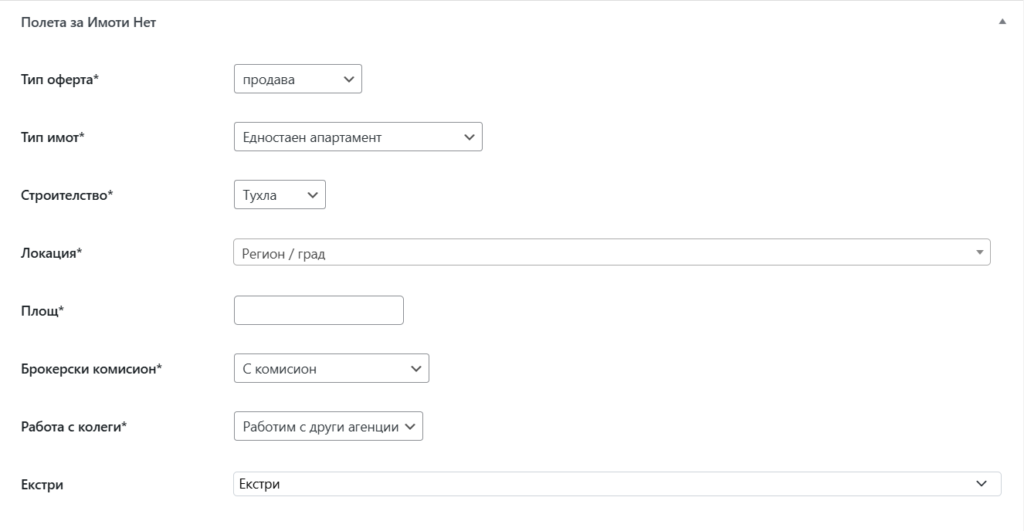
Филтърът „imoti_n_cpt_fields“ контролира това. Пример за скриване на отделни полета:
function hide_imoti_n_cpt_fields_func ($cpt_fiels) {

    // Тип оферта
    $cpt_fiels['imoti_n_offer_type'] = true;

    // Тип имот
    $cpt_fiels['imoti_n_estate_type'] = true;

    // Строителство
    $cpt_fiels['imoti_n_build_type'] = true;

    // Локация
    $cpt_fiels['imoti_n_location'] = true;

    // Адрес
    $cpt_fiels['imoti_n_address'] = true;

    // Площ
    $cpt_fiels['imoti_n_surface_all'] = true;

    // Брокерски комисион
    $cpt_fiels['imoti_n_broker_com'] = true;

    // Работа с колеги
    $cpt_fiels['imoti_n_allow_agencies'] = true;

    // Екстри
    $cpt_fiels['imoti_n_extras'] = true;

    return $cpt_fiels;
}
add_filter('imoti_n_cpt_fields', 'hide_imoti_n_cpt_fields_func', 10, 1);
Можете да премахнете и цялата секция „Полета за Имоти Нет„, в случай, че ще ги свържете с допълнителните филтри.
function disable_imoti_net_fields_func($disable_fiels) {
    $disable_fiels = true;
    return $disable_fiels;
}

/* Филтър за премахване на полета за Имоти Нет за имоти
* imoti_n_disable_properties_metaboxes
*/
add_filter('imoti_n_disable_properties_metaboxes', 'disable_imoti_net_fields_func', 10, 1);

/* Филтър за премахване на полета за Имоти Нет за сграда
*  imoti_n_disable_buildings_metaboxes
*/
add_filter('imoti_n_disable_buildings_metaboxes', 'disable_all_aii_cpt_fields_func', 10, 1);